YOUR TECHNOLOGY. YOUR WAY.
Every location.
One clear view.
Know what comes next.
Bring systems, assets, contracts and operations together. See what needs attention—and who needs to act.
Self-hosted Configured for your organization
Continue to the platformThe whole picture
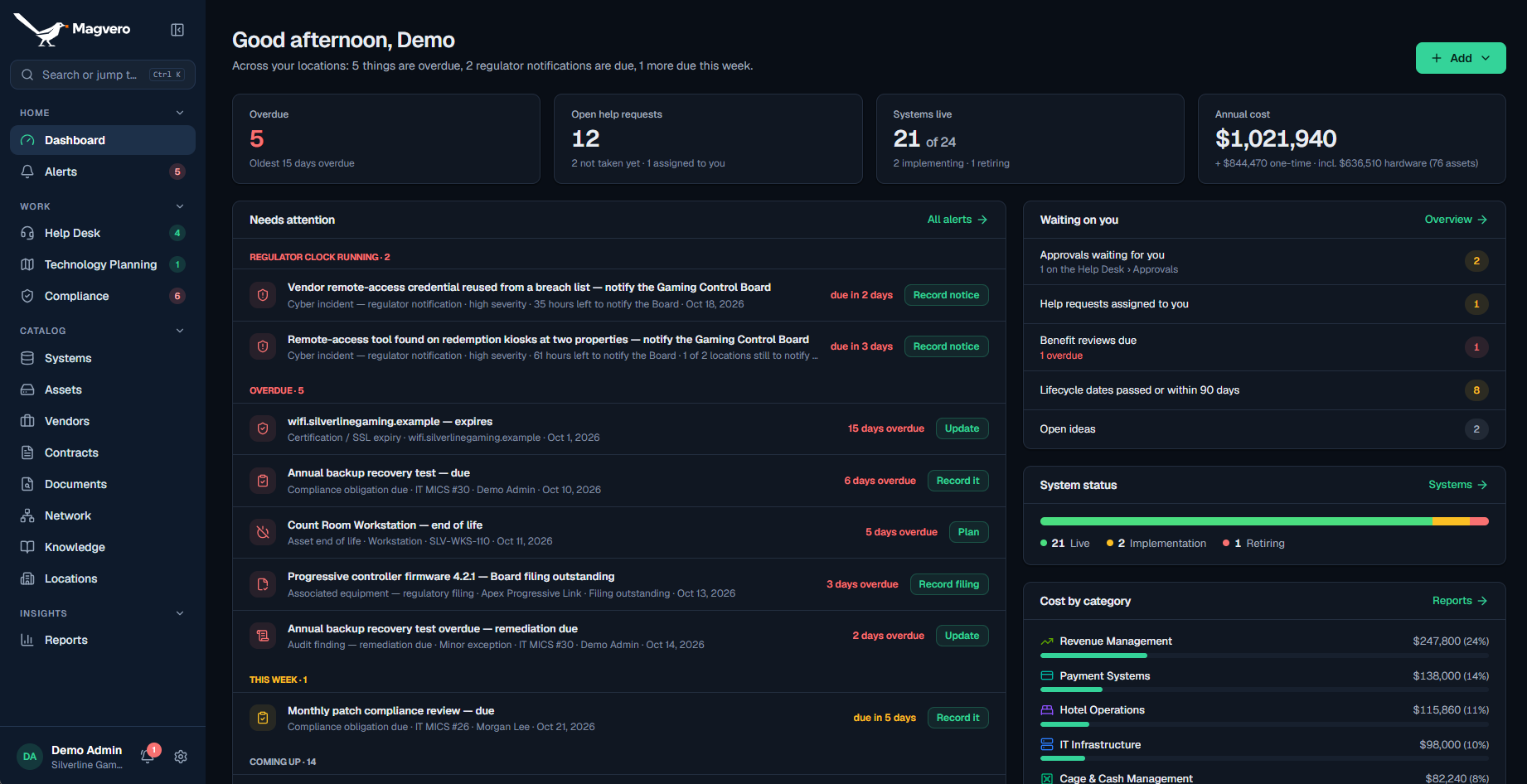
Your technology, organized in one place.
Scroll to explore- 01The whole picture
- 02What needs attention
- 03Who needs to act
- 04One clear view
A CLOSER LOOK
What needs attention
See the priority. Follow it to the record.
Who needs to act
Approvals, support and reviews. Ready for the next step.
The whole picture.
The detail stays connected.
Actual product screen · Casino configuration · Fictional demo data
One connected recordSystems to evidence
Adaptable by designCore + your configuration
Hosted on your termsYour infrastructure, your data
CLARITY STARTS WITH CONTEXT
Your technology runs
the organization.
What keeps track of it?
One spreadsheet for assets. Another for renewals. Evidence in a shared drive. And the person who knows how it all connects is on leave.
Magvero keeps those records together, so you can follow a system to the people, equipment and agreements behind it.
SEE THE RECORDS COME TOGETHER
Separate records.
A connected understanding.
Scroll to bring the context together.
 YOUR TECHNOLOGY, CONNECTED
Who owns it. What it costs. What depends on it.
The context stays connected.
Relationship illustration · No live operational data
01 / THE CONNECTED PLATFORM
The whole picture.
Down to the detail.
Start with a system. Follow it to the asset, the contract, the support request and the evidence. The context stays with you.
What runs your organization?
Know the system. Keep the context.
Owners, vendors, lifecycle dates, costs and dependencies live on one connected record. Follow a system to the people and services behind it.
Before replacing a critical platform, see its support dates and the systems that rely on it.
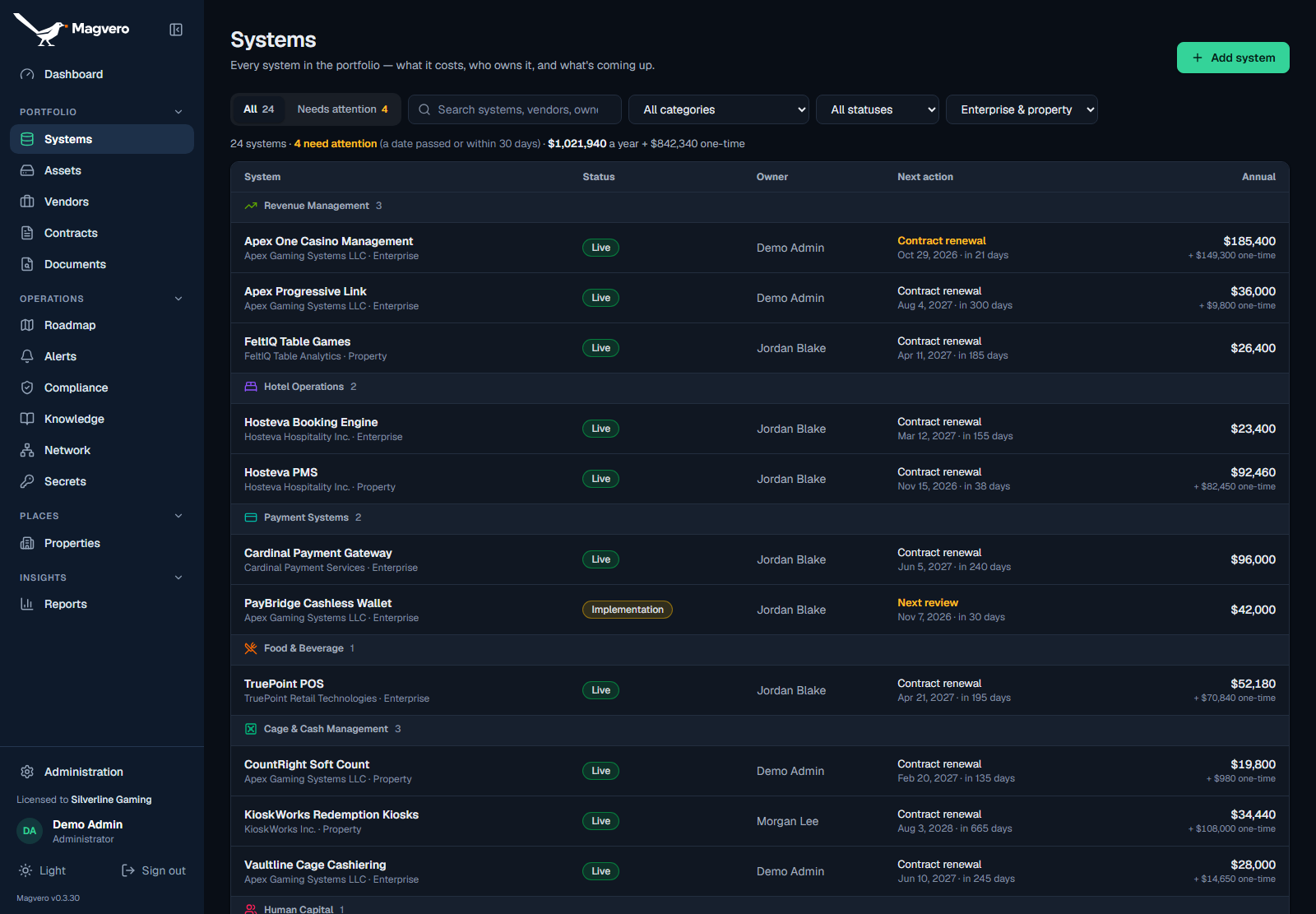
Actual product screen · Casino configuration · Fictional demo data
02 / UNDERSTAND THE CONNECTIONS
Know what depends on it.
Before you change it.
A system rarely stands alone. Follow the dependencies you record and see the downstream impact of a proposed change.
Select a node to trace its dependencies
The picture is only as complete as the relationships your team records. This example is not live monitoring.
Map your environment03 / BUILT AROUND YOUR WORLD
One connected core.
Configured for your industry.
The operational foundation stays connected. The language, modules and regulatory context adapt to your organization.
An adaptable foundation
Keep a shared technology core, then configure the vocabulary, modules, roles and reference data around the way your organization operates.
Industry-specific profiles and regulatory content are scoped and validated with your team.
ONE LOCATION OR A WHOLE PORTFOLIO
A wider view.
The right local context.
Keep enterprise-wide systems visible while giving each team access to its locations. Call them locations or properties—your organization chooses.
Fictional example. Selection filters the records shown here; it does not access your organization.
04 / EVIDENCE, BY DESIGN
Ready for the question.
With the record behind it.
Stay organized before the review arrives. Connect the obligation, the person responsible, the activity and its evidence—then trace the whole story.
- 01
Obligation
What needs to happen?
- 02
Owner
Who is accountable?
- 03
Activity
What was done, when?
- 04
Evidence
Where is the proof?
- 05
Review
Was the result verified?
- 06
Audit pack
Can we show the period?
Certifications · Obligations · Access logs · Incidents · Program changes · Audit findings
See the casino configuration
The supplied Nevada regulatory pack applies location-specific incident notification, associated-equipment filings and obligation categories. Records can include GLI approvals, PCI evidence, MICS duties, access history and finding remediation. These tools organize evidence; your team remains responsible for meeting applicable requirements. They are not Magvero certifications or a guarantee of compliance.
Explore the casino edition05 / OWNERSHIP COMES BUILT IN
Your infrastructure.
Your data.
Your control.
Deploy Magvero on a compatible Docker host, including supported Synology NAS setups. Keep the application and its database under your organization’s control.
- Role and location-based access
- Audited changes and controlled credential reveals
- Backups, approved updates and a recovery path
- Optional local AI with Ollama
YOUR APPLICATIONOPTIONAL, YOUR CHOICE
Architecture illustration. This marketing website is separate from your self-hosted Magvero installation.
- 01
Deploy
Prepare a compatible host. Use the guided setup and agree your backup and recovery process.
- 02
Organize
Import records, link systems and assets, set permissions and choose your organization’s configuration.
- 03
Operate
Review alerts, manage support and investment, and keep evidence alongside the work.
06 / INTELLIGENCE WITH CONTEXT
Less time searching.
More time managing.
Use your provider or a local Ollama model. Connect an assistant to the operational record through logged, read-only MCP access.
- Follows the user’s permissions and location scope
- Secret values are excluded
- AI drafts; people review and approve
Start with the renewal record.
A connected assistant can read contract dates, costs and ownership within your permitted scope. Follow the answer back to the contract before deciding what to renew.
Prewritten capability examples. This website is not connected to an AI service or your operational data.
07 / A CLEAR WAY FORWARD
An enterprise view.
A license that fits.
Start with your organization, your locations and the configuration you need. We’ll work through the deployment and pricing with you.
Discuss your organizationStarting at
$20,000per property / year
- Annual software license
- Software updates and support
- Self-hosted deployment
- Offline license keys
Other industry configurations are scoped individually. If a renewal lapses, your records remain accessible in read-only mode.
01What is Magvero?
Magvero is a self-hosted system of record for technology operations. It connects systems, assets, vendors, contracts, network plans, documents, support, planning and compliance evidence.
02Is Magvero only for casinos?
No. The core is built around industry-neutral technology operations. Industry profiles add terminology, modules and reference data; regulatory packs add location-specific rules. Casino is the first supplied profile. Other industry configurations and regulatory content are scoped and validated with your organization.
03What can we customize?
Administrators can configure location terminology, modules, reference data, permissions, approval roles, endpoint-agent lists, support targets and regulatory-pack assignments. Additional industry-specific profiles or workflows can be discussed during scoping.
04Can we run it on our own infrastructure?
Yes. Magvero runs on a compatible Docker host with PostgreSQL, including supported Synology NAS deployments. Your organization controls the application installation and its records.
05Can it cover multiple locations?
Yes. Systems can span locations, while assets and operational records retain their location context. Role and location permissions determine what each person can access.
06Does it replace an endpoint management tool?
Magvero records assets and tracks the endpoint agents you define. It brings that coverage into the operational record; it does not claim to deploy patches, discover devices automatically or replace your endpoint tools.
07How does it help with audits?
It links obligations and dated completions to owners and evidence, records access, incidents and changes, and tracks remediation separately from verification. An audit pack assembles a selected review period. Your team remains responsible for applicable requirements and the completeness of its records.
08How are credentials handled?
The credential register tracks names, ownership and rotation. Your administrator may enable the self-hosted encrypted vault using a customer-held key. Reveals require reauthentication and are audited. Cloud demo instances hold credential metadata only.
09Can we use a local AI model?
Yes. Local Ollama is supported alongside external AI providers. AI-assisted intake creates drafts for people to review. MCP assistant access is read-only, follows the user’s scope and logs calls; secret values are excluded.
10How do backups and updates work?
The self-hosted deployment supports scheduled backups, in-app backup management and approved restores. An administrator chooses a release and maintenance window; the host task backs up, applies, checks health and rolls back if an update fails.
11How is Magvero licensed?
Licensing is annual, with offline keys, updates and support. Published casino pricing starts at $20,000 per property per year. Other industry configurations are scoped to your organization. A lapsed renewal leaves records accessible in read-only mode.
12What will we see in the demo?
The current live demo is the casino configuration, using a fictional multi-property organization. Access is handled through the existing Casino Tech Stack verified company-account process. We can also discuss a walkthrough relevant to your industry.
YOUR NEXT CLEAR STEP
Bring your technology
into focus.
Tell us about your organization. We’ll talk through your environment, the configuration you need and how Magvero could fit.
hello@casinotechstack.comThe current live demo uses fictional casino data. Ask us for a conversation focused on your industry.